


You learned JavaScript's basic concepts and want to take it to the next level? You've made the right choice! JavaScript (JS) has been the most used programming language for quite a few years. It was even the most used language in 2025 according to Statista!
But as you grow beyond basic syntax (variables, structures and simple functions), you must know that mastering more advanced concepts goes beyond features. Rather, it's about why each of them matters, how they influence intent and how they shape architectural clarity.
Here's a clarity-first reframing of 12 advanced JavaScript concepts to write more predictable, expressive and maintainable code. Are we on the same page? Perfect! Grab your favorite drink and sit tight because we're about to become experienced developers!
Why Decision-Makers Should Care About JS
Advanced JS concepts are often framed as implementation details, but from a Shaped Clarity™ lens, they're also signals of how a product thinks, learns and scales. Yes, decision-makers don't need to code these concepts, but they do need to recognize the structural consequences of using or misusing them.
Each of these edges directly influences product speed, system resilience, and organizational clarity. But what do these advanced JavaScript concepts control at a product level?
- System-level intent: Concepts like closures, currying, and higher-order functions can determine whether business rules remain localized or leak unpredictably.
- Uncertainty management: Event loops, promises, async/await, and generators can shape how products behave under load, during failures and in moments of friction.
- Debt compounding: Prototypal inheritance, functional patterns and memoization can affect whether changes remain isolated or trigger cascading refactors.
- Behavior reasoning: Hoisting, callbacks and IIFEs can influence whether code can be read top-down and understood quickly.
For advanced digital products, the ones that are expected to evolve continuously without losing direction, the use of these concepts can be what achieves:
- Speed without fragility: Faster shipping only works if the underlying behavior remains predictable.
- Scalability without confusion: Growth exposes hidden coupling and these concepts either contain it or amplify it.
- Learning without noise: Products are learning systems, and signals can degrade due to unclear async behavior, state and side effects.
- Alignment across roles: When technical structures clearly reflect intent, designers, PMs and engineers can reason about outcomes together.
We're not saying that decision-makers must memorize JavaScript advanced concepts, but they should understand which technical choices preserve clarity, which accelerate experience debt and which patterns support long-term adaptability.
12 Key JS Advanced Concepts
JavaScript Closures
A JS closure involves a function and any other data the function can access, meaning it's a function that uses variables from the outer lexical scope. The interpreter considers any arguments you pass to functions from the global space: if a function only relies on its internal values and parameters, it's not considered a closure. Functions can access values from other external functions considered closures. Let's see an example:
The interpreter stores data in Heap Memory, calls the function and knows the free variables' values, which also requires more memory and processing power. Closures are great for data encapsulation, as well as removing redundancy and maintaining modular code.
JS Closures
- Goal: Preserve contextual state without coupling it to unrelated parts of the system
- Advantage: Making encapsulation explicit and keeping states where they belong.
- Use Case: UI components that need to remember user preferences without coupling that state to global stores or DOM logic.
JavaScript Inheritance
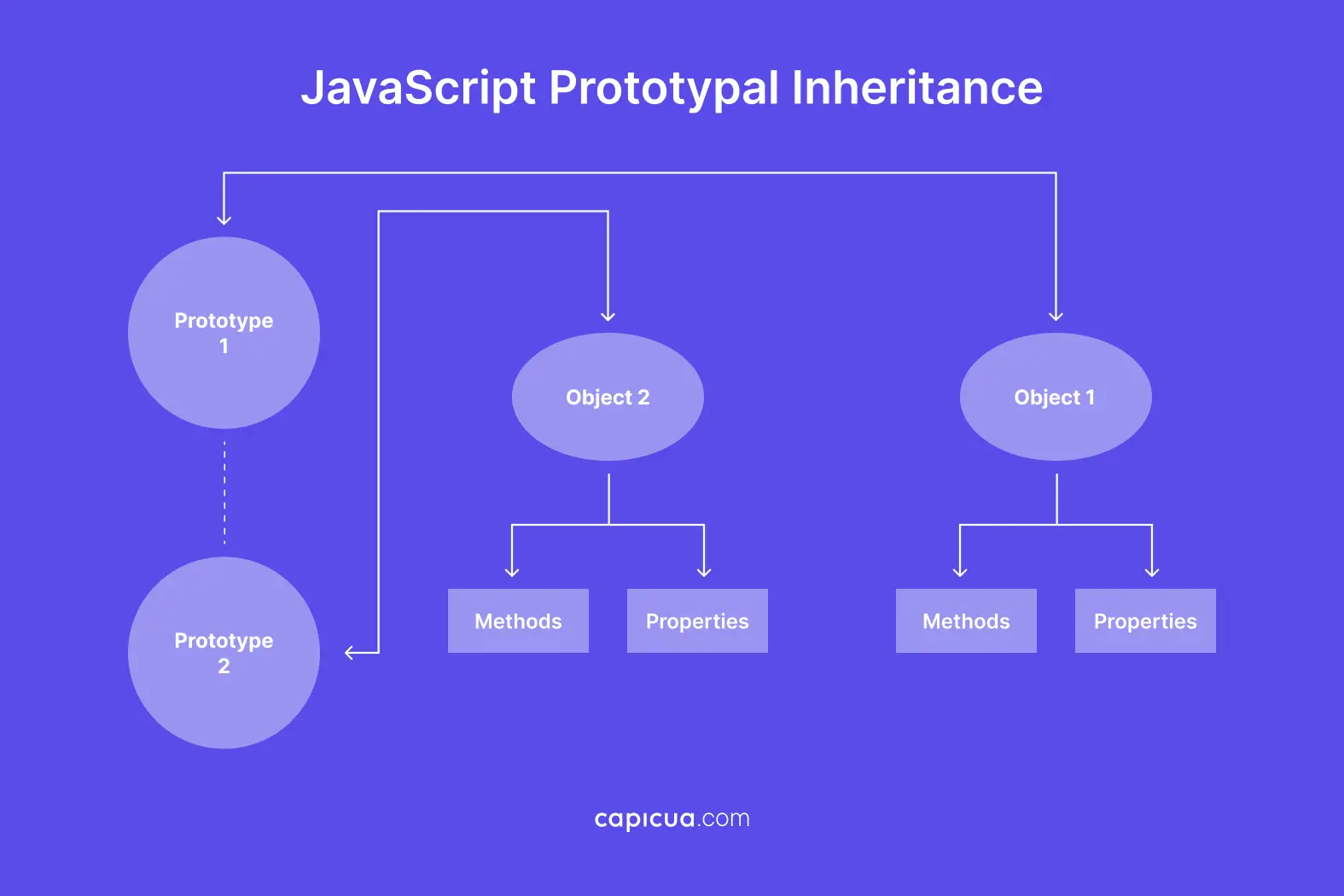
You might also have heard the term "prototypal inheritance." In the prototype chain, all objects have a private property called "[[Prototype]]" that allows them to inherit properties from each other. This property allows JS objects to inherit methods from other objects.
Some data types, such as Strings, Numbers and Arrays, inherit valuable methods, and the interpreter will look up a matching name on the object when searching for a property or method. If it can't find it, it'll also seek the object's property and even the property of the property, until it reaches the end of the chain.
JS Inheritance
- Goal: Share behavior across objects without rigid inheritance trees.
- Advantage: Allowing behavior to remain discoverable and overridable as systems evolve.
- Use Case: Design-system component libraries where all buttons share accessibility and interaction logic, but individual button types override styling or behavior.
JavaScript Event Loops
Both the browser and Node.js run a single-threaded event loop and execute only one line of code at a time. Think of it as a circle in which browsers repeatedly run a process while checking for code execution. But sometimes devs deliberately queue tasks for the browser to execute them on the next event.
This loop checks for pending tasks and runs them in a specific order to let asynchronous code behave predictably. Thanks to this mechanism, the browser can execute tasks in a non-blocking way, which is handy since modern websites have many things going on.
JS Event Loops
- Goal: Controlling order in single-threaded environments without blocking responsiveness.
- Advantage: Making async behavior explainable.
- Use Case: Coordinating API calls, UI updates, animations and user interactions in responsive interfaces.
JavaScript Callbacks
You can think of callbacks as named contracts for asynchronous operations and deferred execution. The interpreter will give you the results of every function in the order they appear, starting from the top of the file and going downwards.
However, if a function takes a long time to complete its task, the next one will execute first, which might be different from what you expected when you wrote the functions.
You can quickly solve that by passing the first function as a parameter to the next one. And that's a callback function. Callbacks express what should happen after completing a task. With clear error-handling patterns, they help manage flow without confusion.
You'll often see callback functions where the first lines involve a lengthy task, such as fetching data from an API. That's why you'll see some people use setTimeout(), but bear in mind that you'll fall into callback hell if you overuse them or nest too many.
JS Callbacks
- Goal: Separating an operation from its outcome logic.
- Advantage: Making flow control visible at the call site, reducing hidden dependencies.
- Use Case: Reusable utilities (validators, processors, fetchers) that must behave differently depending on context.
JavaScript Async/Await Promises
In JS, promises are objects that represent values that will become available in the future, so their value is "pending." Both Async and Await are unique keywords that modify JavaScript functions to make promises easier to write. Devs use Async to define asynchronous functions, as they're perfect for operations that involve many iterations, such as fetching data from an API or reading a file from a disk.
These asynchronous functions will automatically return a promise, but you can pause their execution with the Await keyword. The function will wait for other promises to resolve, improving readability and error handling.
JS Async/Await Promises
- Goal: Representing time-dependent operations without fragmenting logic.
- Advantage: Facilitating the readability, debugging and review of asynchronous code while lowering cognitive load.
- Use Case: Multi-step processes like authentication, checkout flows, or sequential data pipelines.
JavaScript Functional Programming
Functional programming encourages only pure functions, avoiding mutability and side effects. It can sound tiresome, yet the benefits can far outweigh the trouble. You must also embrace high-order functions, which we'll cover in a sec. First, let's look at an example of functional programming in JavaScript.
By avoiding side effects and mutation, functional programming removes ambiguity from data flows and makes reasoning about data transformations explicit.
JS Functional Programming
- Goal: Making data transformations explicit and predictable.
- Advantage: Logic becomes easier to test, reason about and refactor safely.
- Use Case: Business-critical computations such as pricing logic, eligibility checks or analytics processing.
JavaScript High-Order Functions
A high-order function is a function that takes one or multiple functions as parameters or returns a function. Like any other function, you can pass them as values, which favors reusability and makes code more concise and declarative. Let's see some examples:
JS has a few built-in high-order functions that help perform complex operations and are essential for interacting with frameworks like React, Vue, and Angular. When functions accept or return other functions, devs can focus on describing what work should happen.
JavaScript Reduce()
Reduce() takes an array of elements and applies a function to each element. It accumulates all the elements and returns a single value.
JavaScript Map()
The Map() function allows you to modify each element of an array and return a new identical array. You can also accomplish this by using for loops or nesting, but Map() provides a more elegant way to do it by following the rules of functional programming.
JavaScript Filter()
This function can filter an array based on a condition and return a new array containing the elements that pass the condition. The original stays as it is since it returns a new array.
JavaScript Sort()
The sort() function allows you to overwrite an array by sorting its elements. If it's an array of integers, it'll sort it in ascending order by default. If it's an array of strings, it will sort them alphabetically. If you don't want to sort an array in alphabetical or ascending order, you can easily sort arrays in non-alphabetical or descending order by combining sort() with reverse(). After sorting the list, you have to do listname.reverse() to reverse its order.
JS High-Order Functions
- Goal: Expressing what should happen independently of how it happens.
- Advantage: Fostering reusable patterns without copying logic across the codebase.
- Use Case: Applying shared concerns like logging, validation, permissions or transformations across multiple workflows.
Common JS High-Order Functions
- Reduce(): Applies a function to each element of an array
- Map(): Modifies each element of an array and returns a new identical array.
- Filter(): Filters an array based on a condition and returns a new array containing the elements that pass the condition.
- Sort(): Overwrites an array by sorting its elements.
JavaScript Generators
A generator is a special function that you can pause and resume for a new way to interact with iterators and regular functions. Instead of producing all values simultaneously, generators produce them in sequence on the fly.
In JavaScript, you can create functions using the function* syntax and the keyword yield to stop the function and return a value to the user. Generators enable functions to pause and resume, producing values one step at a time.
Generators don't produce those values simultaneously, making them more memory-efficient than arrays. This advantage makes them well-suited for iterating over large datasets.
JS Generators
- Goal: Modeling processes that unfold over time or in stages.
- Advantage: Controlling the intentional use of memory usage and execution flow.
- Use Case: Pagination, streaming data, background processing or infinite scrolling mechanisms.
JavaScript Hoisting
Hoisting allows you to declare variables and functions after their assignment as if the interpreter hoists those variables and functions to the top of the scope. You can only use hoisting with the function and var keywords; if you use cons or let, the interpreter will not hoist the variables or functions you declare.
JS Hoisting
- Goal: Resolving identifiers before runtime logic begins.
- Advantage: Preventing temporal confusion and hard-to-trace bugs.
- Use Case: Structuring large modules so capabilities are declared clearly before they are used.
JavaScript IIFEs
An IIFE (Invoked Function Expression) is a function that's not stored in variables and doesn't receive a name: it just runs after you call it. Using closures avoids declaring variables in the global scope, which can be handy and improve code quality.
JS IIFEs
- Goal: Containing setup logic without leaking variables or state.
- Advantage: Isolating initialization in a readable and disposable manner.
- Use Case: Bootstrapping analytics, feature toggles or legacy integrations.
JavaScript Memoization
When building large applications, devs use complex functions that can take a while to load. Sometimes these functions receive many calls to return the same value repeatedly, which can be highly inefficient.
Memoization catches values based on the arguments; when the function is called again, it returns the result instantly. Since it's an essential topic for building top-performing web apps, you're likely to see this core principle of dynamic programming in libraries like React.
JS Memoization
- Goal: Optimizing repeated operations without altering external behavior.
- Advantage: Improving performance while maintaining behavioral consistency.
- Use Case: Expensive calculations in rendering pipelines, selectors or derived state logic.
JavaScript Currying
In JS, currying transforms a function that takes many arguments into a sequence of functions that each take only one argument. This technique owes its name to mathematician and logician Haskell Brooks Curry, and the concept of currying comes from the Lambda Calculus. Let's go back to how you can use currying in JavaScript.
JS Currying
- Goal: Allowing partial application of logic while deferring final execution.
- Advantage: Expressing function intent incrementally.
- Use Case: Pre-configured utilities such as API clients, validators, formatters or permission checks.
Conclusion
Each concept explored in this article, such as closures, async flows, functional patterns, generators and memoization, exists to solve a specific problem of scale: the scale of logic, the scale of interaction, the scale of teams or the scale of change.
For developers, these concepts enable code that can be reasoned about, extended and trusted. For decision-makers, they shape whether a product remains steerable as it evolves, whether learning loops stay intact, whether changes stay contained, and whether speed translates into sustainable growth rather than fragility.
Analyzing JavaScript concepts from a Shaped Clarity™ perspective is about choosing the right structures to make what a product is meant to do visible, even as complexity increases. This mindset is what ultimately separates advanced-grade digital products from merely functional ones. So grab another cup of coffee, and happy building!