


The interface that won your first customers starts slowing down the next ones: screens multiply, every squad ships its own button, and each release adds another option to an already crowded toolbar. Knowing how to improve user interface quality at that stage separates products that compound from products that keep getting redesigned.
In Figma's 2026 AI report, 90% of designers, developers, and product managers said design is at least as important as before AI, and nearly six in ten said it matters more. Nielsen Norman Group adds the uncomfortable corollary that, as AI improves, almost anyone can produce a decent-looking UI. This guide covers user interface design decisions, from visual hierarchy and design systems to UI accessibility, performance, and AI-ready patterns.
What Does It Mean to Improve User Interface Design?
To improve user interface design means making a product's visible, interactive layer (layouts, components, typography, color, controls, and feedback) clearer, faster, and more consistent so users can complete tasks with less effort and fewer errors. User experience describes the whole journey; the user interface makes that journey tangible, one screen at a time.
Figma's 2026 research, built on 8,403 survey responses and 639 interviews across three years, found that designers participating in development rose from 21% to 41% in a single year, while developers doing design work rose from 44% to 60%. More hands on the interface means faster output and a much higher risk of drift. For a founder or product leader, UI improvement is a lever on activation, support load, and sales cycles. A clear interface shortens time to value in trials, reduces "where do I find" tickets, and survives the side-by-side comparisons buyers run during procurement.

How to Improve User Interface Clarity With Visual Hierarchy
The fastest way to improve user interface clarity is to establish visual hierarchy: one dominant element and one primary action per screen, supported by secondary content that recedes through size, weight, color, and spacing. Hierarchy tells users where to look first, which matters more as products accumulate features.
Pendo's product benchmarks show that even best-in-class products concentrate 80% of clicks in roughly 15.6% of features, while the rest still compete for space in navigation and toolbars. Baymard Institute's 2026 research roadmap points to the same pattern in navigation-heavy interfaces: 67% of mobile sites deliver mediocre to poor navigation performance, and 80% have serious product list issues, a close analog to the tables and lists that dominate B2B dashboards.
UI design best practices for SaaS products include:
- One primary action per screen: Give the most valuable action a filled, high-contrast button and demote everything else.
- Navigation organized by jobs: Group menu items by what users are trying to accomplish, and cap top-level items at what people can scan in a glance.
- Progressive disclosure: Move rare, advanced, and destructive actions behind menus or secondary views.
- A consistent type and spacing scale: Use a small set of sizes and spacing steps so hierarchy reads the same on every screen.
- Status that never relies on color alone: Pair color with labels or icons so meaning survives color blindness and dark mode.
- Data density with purpose: Show the numbers that drive decisions first, then let users drill down.
These principles build on the classics; Capicua's guide to the 8 golden rules of interface design covers their foundations.
How Design Systems Improve User Interface Consistency
A design system improves UI consistency by turning design decisions into shared design tokens, components, and patterns, governed so every team ships the same quality without re-deciding the basics. It is the mechanism that lets a UI improvement made once reach every screen.
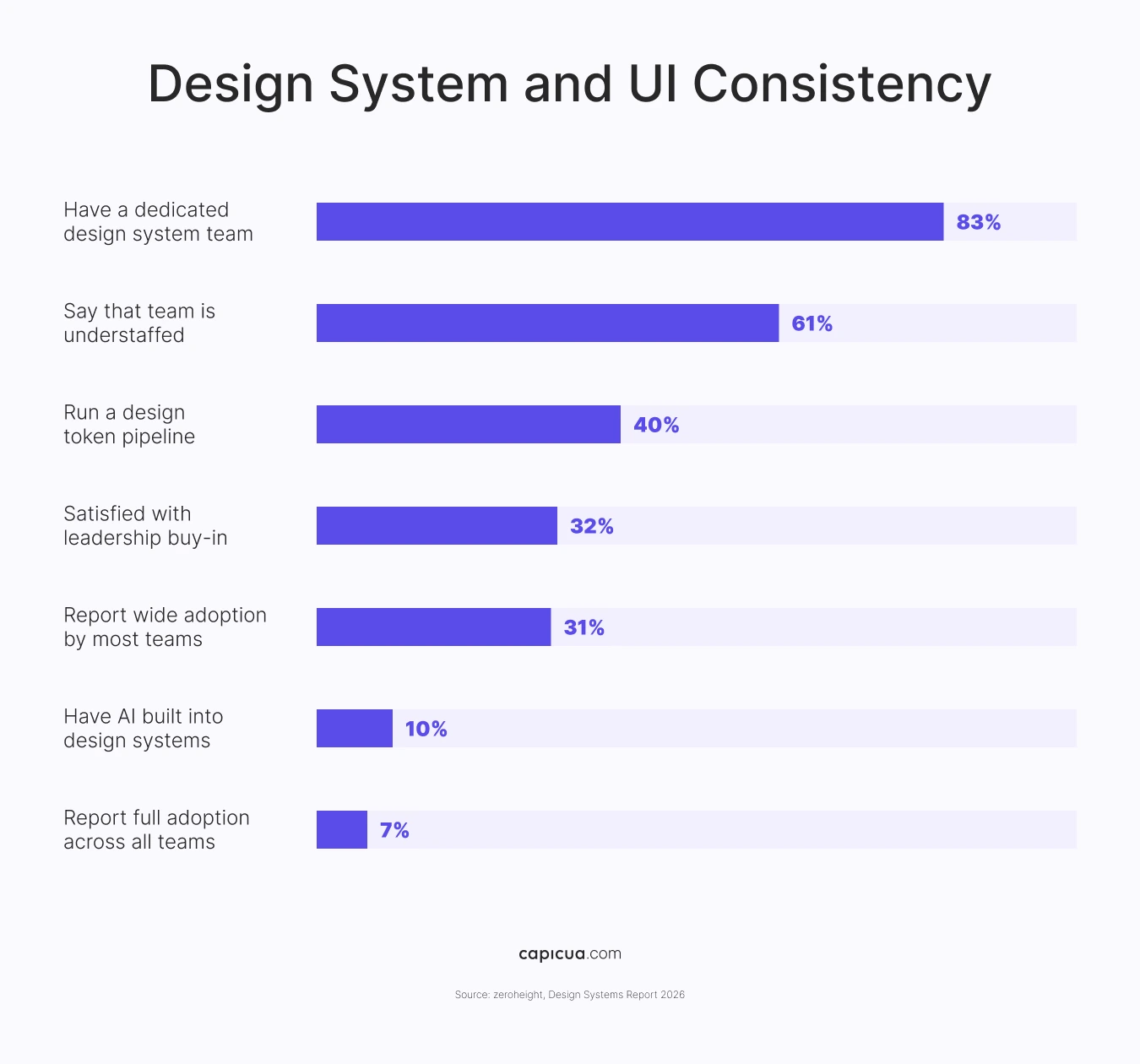
The zeroheight Design Systems Report 2026 found that 83% of organizations have a dedicated design system team, yet only 7% report full adoption across all teams and 31% report wide adoption by most teams. Satisfaction with leadership buy-in fell from 42% to 32% in a year, 61% say their team is understaffed, and only about 40% run any form of token pipeline. For product leaders, the implication is to treat the design system as a product with its own roadmap, users, and adoption metrics. Measure component coverage by product area, fund a token pipeline so changes flow automatically from design to code, and make the system the fastest path for squads so using it becomes the default.
How to Improve User Interface Accessibility and Performance
To improve user interface accessibility and performance, fix the failures that affect every user first: low contrast, unlabeled inputs, small targets, and slow interactions. Teams often miss these issues, but users and enterprise buyers notice them immediately.
The WebAIM Million 2026 found detectable WCAG 2 failures on 95.9% of the top one million home pages, averaging 56.1 errors per page. Low-contrast text appeared on 83.9% of pages, 53.1% lacked alternative text, and 51% had unlabeled form inputs. WCAG 2.2 adds a clear, testable bar for controls: under Success Criterion 2.5.8, pointer targets should be at least 24 by 24 CSS pixels at level AA, and text contrast should reach 4.5:1. Regulation is tightening too, with the European Accessibility Act covering e-commerce, banking services, e-books, and other digital products sold in the EU.
Performance is the other half of UI quality, with the HTTP Archive Web Almanac reporting that only 48% of mobile sites and 56% of desktop sites pass all three Core Web Vitals, and 77% of mobile sites deliver a good Interaction to Next Paint (how quickly the interface responds to taps and clicks). Regarding forms, Baymard's checkout benchmark found that 94% of sites lack adaptive inline validation, a small UI pattern with a large effect on errors.

How to Improve User Interface Design for AI Features
To improve user interface design for AI features, make the system's behavior visible and controllable: show what the AI is doing, let users review and undo its actions, and keep a clear path to an alternative. AI interfaces live or die on trust, and trust is a UI problem.
Nielsen Norman Group's State of UX 2026 warns that people burned by AI features hesitate to adopt new ones, and that confidence depends on transparency, control, consistency, and support when the system fails. Customers agree: in a Gartner survey, 87% said access to a human agent is essential when companies use GenAI for service. The bar for AI usability is already high, with MeasuringU's 2026 benchmark placing leading AI chat products between 78.4 and 81.5 on the System Usability Scale, well above the average of 68.
In Jan 2026, the W3C launched a Generative UI Community Group to work on standards for interfaces assembled by AI at runtime. A Generative UI GenUI strategy raises the stakes for design systems, since AI can only compose good interfaces from well-defined components. Interface choices shape user decisions.
Trustworthy AI features follow four UI patterns:
- Label AI-generated content and show its sources or inputs.
- Preview consequential actions before the AI executes them, with a one-click undo.
- Communicate uncertainty plainly, designing for trust calibration.
- Keep a visible manual path or human handoff in every AI flow.
How to Measure UI Improvements and Prove ROI
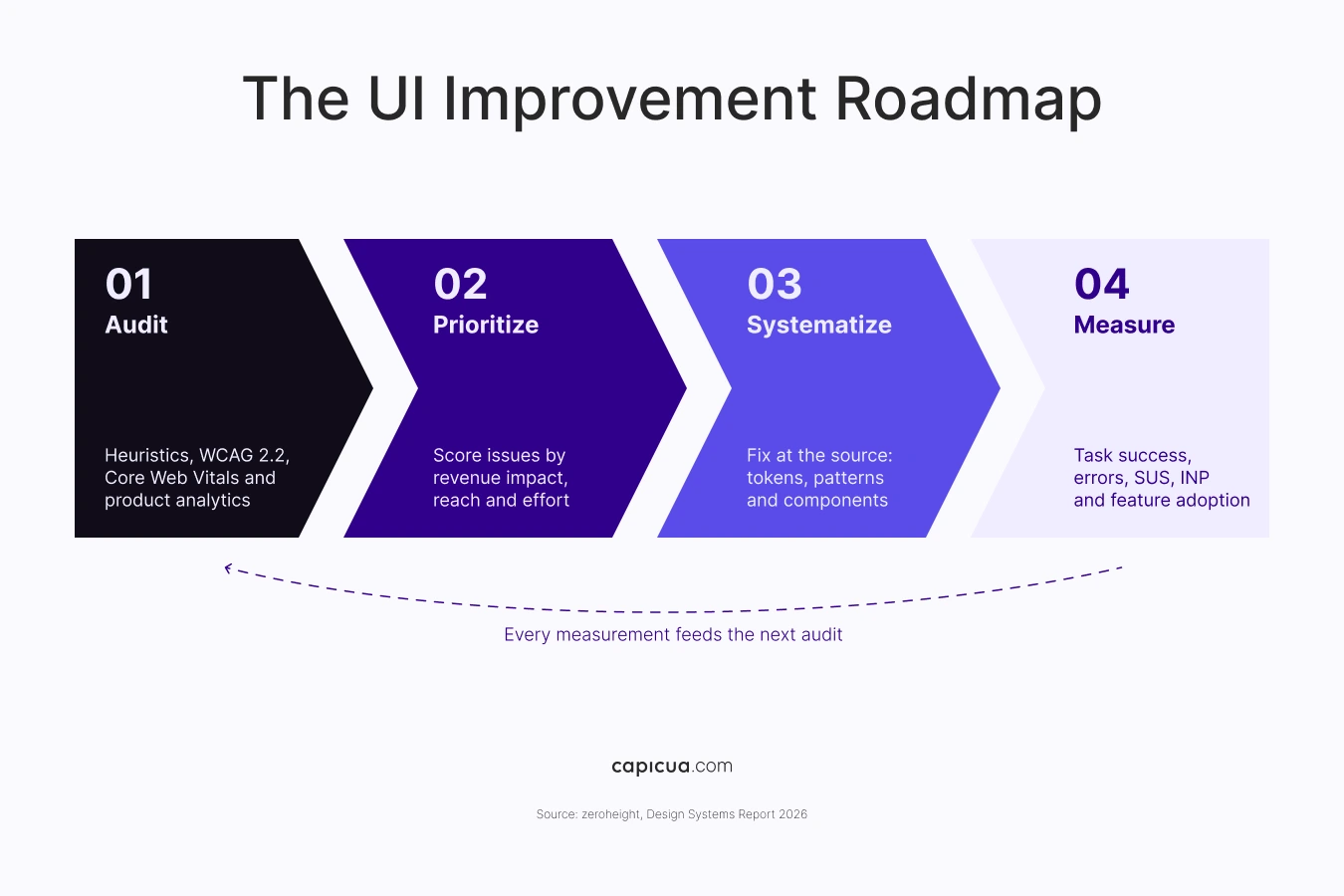
To measure UI improvements, baseline behavioral and technical metrics for each flow or component before you change it, then compare after release. UI improvement earns budget when it shows up in the same dashboards as activation, retention, and support cost.
Start with retention as the north star: best-in-class three-month retention is at 57%, and interface friction in core flows is one of the most controllable drivers of that number. Then connect it to metrics the design team can move directly:
- Task success and time on task for the three flows that drive activation and expansion.
- Error rate, especially form validation errors and repeated attempts.
- Perceived usability with a standardized survey such as SUS.
- Core Web Vitals, with Interaction to Next Paint tracked per key screen.
- Accessibility error count from automated checks in CI, trending toward zero.
- Design system coverage: the share of screens built from system components.
Cluttered screens, unadopted design systems, and opaque AI features all stem from teams shipping interface decisions without a shared definition of what clear looks like. Shaped Clarity™ is Capicua's lens for setting that definition, aligning product, design, and engineering on the outcomes each screen must serve and grounding every UI decision in real user evidence. Discover Shaped Clarity here.
Conclusion
The teams that improve user interface quality fastest set visual hierarchy deliberately, encode it in a design system people actually adopt, hold it to accessibility and performance standards, and measure the results against business outcomes.
To improve user interface across your product without the rework, contact us or book a call.