

The January 2026 employment projections from the U.S. Bureau of Labor Statistics (BLS) state that "the growing adoption of AI technologies, including generative AI tools, and resulting productivity gains are expected to dampen labor demand in a variety of fields, such as sales, design, and administrative support." With a federal agency naming design as an AI-exposed field, distinguishing interaction design ux design matters more than ever.
Companies use user experience and interaction design as synonyms in job descriptions, organizational charts, and vendor briefs. However, the two disciplines fail in different ways, get caught by different review processes, and carry very different automation risk. When a product ships something users find confusing, the postmortem blames "UX," and the team commissions another redesign. The defect was usually far narrower and far cheaper to prevent: interaction design vs user experience is a question about accountability.
This guide answers the practical version of user experience design vs interaction design: what each discipline owns, why behavioral defects reach production while visual defects rarely do, which is more defensible as AI absorbs production work, how to divide the responsibilities, and what to measure.
What is the Difference Between Interaction Design and UX Design?
Interaction design is the design of how a product behaves in response to input, while UX design is the design of the entire relationship a person has with a product, from the reason they arrived to the outcome they leave with. To summarize, interaction design is a component of user experience design, not a competitor to it.
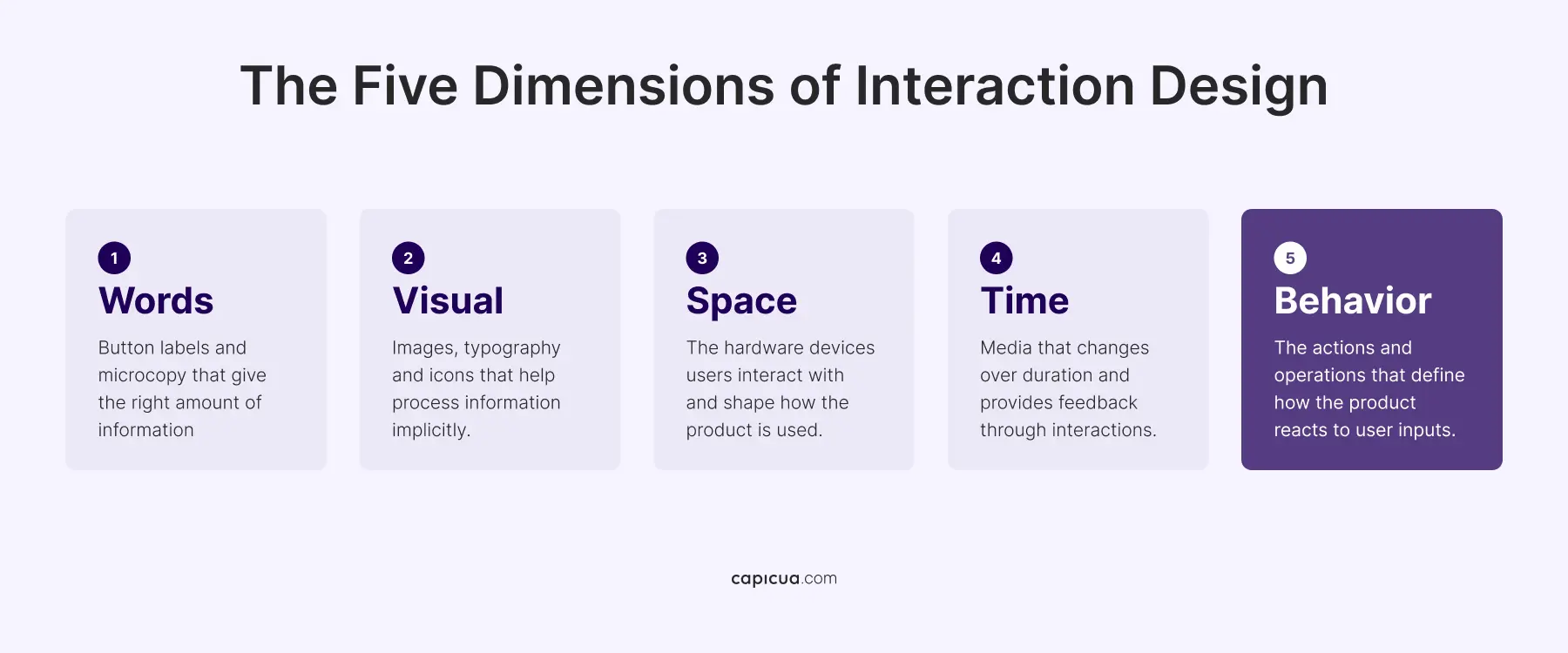
The Interaction Design Foundation defines it as "the design of interactive products and services in which a designer's focus goes beyond the item in development to include the way users will interact with it". The model, first defined by Gillian Crampton Smith at London's Royal College of Art and senior designer Kevin Silver, breaks interaction design into five dimensions: words, visual representations, objects, time, and behavior. The fifth dimension governs the other four because it describes how the product reacts to what a person does.
The five dimensions of interaction design are:
- Words: Words encompass all text elements, such as button labels, navigation menus, and system instructions. They must be simple, direct, and easy to understand so they provide clear direction without overwhelming the user.
- Visual: Visual representations include graphic elements like typography, icons, diagrams, and images that supplement text. They help users process information implicitly and heavily influence the emotional response and aesthetic appeal of the interface.
- Objects: Physical objects and space refer to the actual hardware devices users interact with, such as smartphones, laptops, or smartwatches. This dimension shapes the physical constraints, screen sizes, and context of how the product is used.
- Time: Time represents media that changes over duration, such as animations, videos, and sound effects. This dimension helps users track progress through an interaction and provides crucial feedback, like a loading spinner or a success sound.
- Behavior: Behavior defines the actions and operations of the system, dictating how the product reacts to user inputs. It brings the previous four dimensions together by mapping out user workflows, feedback loops, and the overall functional experience of the product.

Nielsen Norman Group frames the impact of interaction design as visual design determining how an interface looks, content design determining how it sounds, and interaction design determining how it feels. NN/g's reporting on CHI research found that prototypes with consistent behavior read as "sincerity and competence," while inconsistent ones triggered "surprise and anger." Users meet brand values at the save button, rarely at the color palette.
UX design covers positioning, research, information architecture, journey mapping, and onboarding. As IxDF puts it, "the central role of interaction designers targets the moment of use," while "UX design goes far beyond that." A useful test: if a document can answer the question, it's UX design. If answering it requires something responding to a click, a keystroke, or a delay, it's interaction design.
What Does Interaction Design Do That UX Design Does Not?
An interaction designer specifies system behavior: states, transitions, feedback, latency, error recovery, and the exact response to every input a person can produce. A UX designer specifies intent, context, and sequence.
The deliverables of the interaction designer role include:
- State specification: loading, empty, error, partial-data, offline, and permission-denied states for every component. Most user experience and interaction design handoffs document the happy path and leave the other six to implementation.
- Feedback and timing: what confirms an action succeeded, and what happens when a request runs long.
- Microinteractions: the atomic units of behavior and details' execution, described by Dan Saffer as the difference between a "tolerable" and a "treasured" product.
- Input affordance: whether a control looks operable, whether the target is large enough, whether focus is visible, and whether a drag has an alternative.
- Error recovery: what a person can undo, what they must redo, and what the system remembers on their behalf.
The standards bodies have moved in this direction too. WCAG 2.2 became a W3C Recommendation on 12 December 2024, adding nine success criteria: Focus Not Obscured, Focus Appearance, Dragging Movements, Target Size, Consistent Help, Redundant Entry, and Accessible Authentication among them. Almost every new criterion in the most recent revision of the world's primary accessibility standard is an interaction requirement: anyone still auditing accessibility as a contrast-ratio exercise is auditing the wrong layer.
Why Interaction Design Failures Cost More Than Visual Design Failures
Interaction design failures cost more because they survive design review, reach production, and then get misdiagnosed as strategy problems. While visual defects are caught by anyone who opens the file, behavioral defects require someone actually to use the thing.
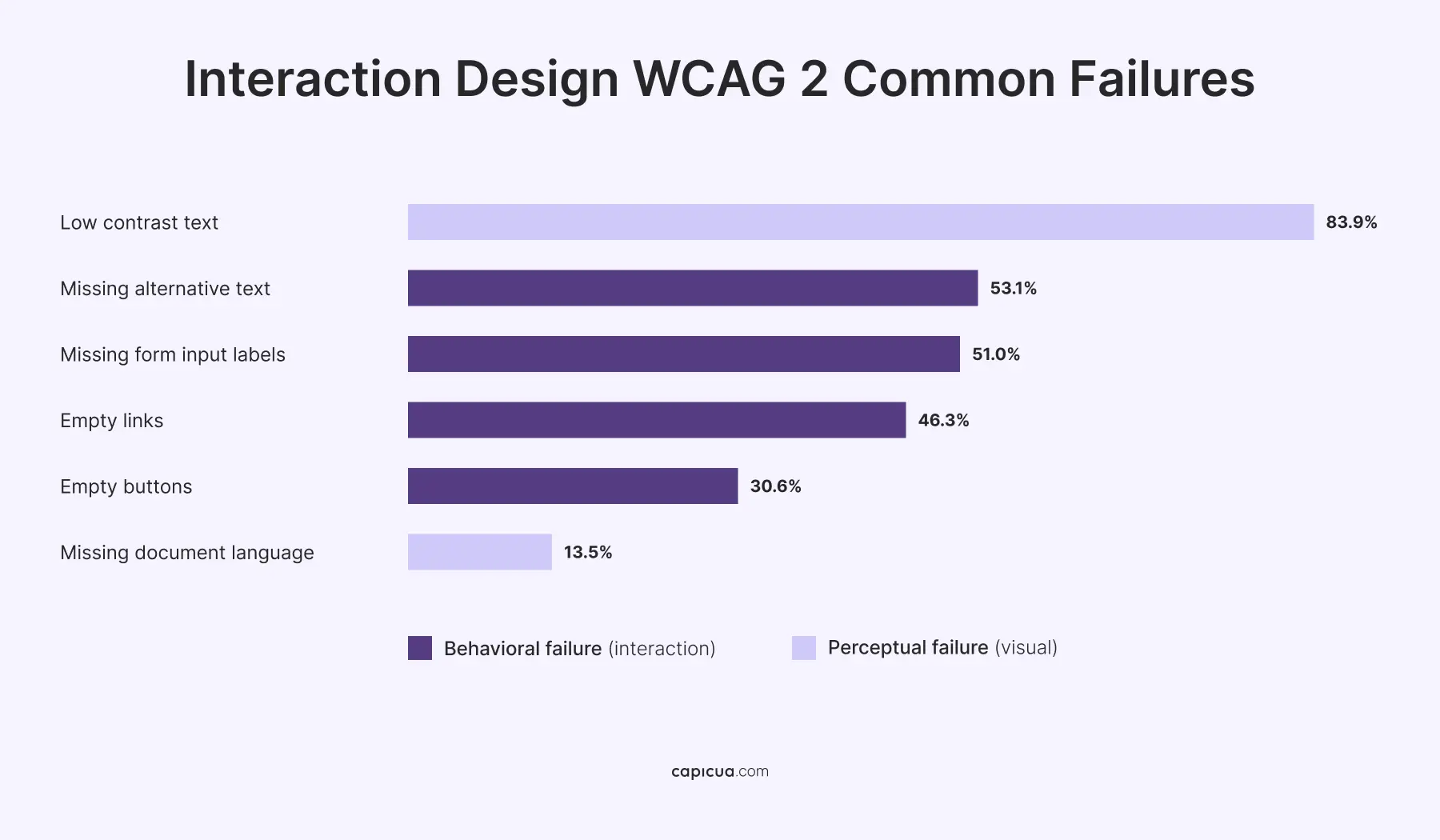
The WebAIM Million, published in February 2026, tested the top one million home pages and found WCAG 2 failures on 95.9% of them, averaging 56.1 errors per page. Six error types account for 96% of all failures, and four of them are behavioral: missing ALT text at 53.1%, missing form input labels at 51%, empty links at 46.3%, and empty buttons at 30.6%. An empty button looks fine in a design file; it fails only when something tries to interpret it.
Baymard Institute's checkout research shows the same pattern with money attached. In its analysis of 41,000-plus reviewed checkout scores across 180-plus benchmarked ecommerce sites, only 2% rated "good" and none rated "perfect," and 32% of users failed to complete required fields on forms that marked only the optional ones. The visual design and information architecture of those forms are both fine; it's the labeling system's behavior that fails. Baymard estimates the average large ecommerce site can gain as much as a 35% increase in conversion rate by correcting checkout design.
Meanwhile, aggregate metrics are moving the wrong way. Contentsquare's 2026 Digital Experience Benchmark Report, drawn from 99 billion sessions across 6,500-plus websites, found engagement down 10% year over year and conversion down 5.1%, even as average order values rose 6%.
A visual defect is caught in the design phase, where the cost of change is a file edit. Still, a behavioral defect is caught in production, where the cost includes engineering time, regression risk, a release cycle, and whatever revenue leaked in between. Unspecified behavior becomes an implicit decision, and implicit decisions accumulate until the product does something nobody chose.

User Experience Design vs Interaction Design in AI Automation
Interaction design is currently the more defensible of the two in day-to-day production work, because generative tools produce plausible layouts far faster than they produce correct behavior. The strategic layer of UX holds for a different reason, and the layer between them is the one under pressure.
The AI in Design Report 2026, from Designer Fund and Foundation Capital, surveyed 906 designers across more than 60 countries and found that 91% now use AI in their design work at least weekly, up from 54% a year earlier. Growth was steepest in code generation and front-end implementation, up 31 points.
The same Designer Fund and Foundation Capital study found that 65% of designers now do work traditionally assigned to product management or engineering, 40% say their PMs and engineers now do more design work, and 34% report collaboration has become messier with roles less clearly defined. Meanwhile, 19% of design leaders cut headcount while expecting the same or greater output.
Nielsen Norman Group's read is direct: "surface-level design won't be enough to stay competitive," and what resists automation is "curated taste, research-informed contextual understanding, critical thinking, and careful judgment." NN/g's analysis reinforces it: of the UX tasks people did not attempt with AI, 42% involved direct interaction with other humans. The work that stayed human required contact with reality.
The practical reading of interaction design vs user experience under AI pressure is that as generation gets cheaper, specificity gets scarce and expensive. A model produces a settings page in seconds and never tells you what happens when the save fails halfway through. We examined that gap in how to add AI features without breaking user experience.

How To Split Interaction Design and UX Design for Product Teams
Most Series A to C teams should make behavior a named, reviewable responsibility inside the roles they already have, because the failure mode is unowned work rather than insufficient headcount. A workable division encloses:
- Assign strategic UX to a person who talks to the market: Research, journey definition, and problem framing need someone with standing to say no to the roadmap. This layer answers whether you should build the thing based on product and UX discovery.
- Assign behavioral specification to a named owner per surface: Someone must be accountable for the states, transitions, and error paths of each major flow. The title matters less than the accountability being traceable to a person.
- Make behavior a review gate: A clickable prototype covering the non-happy-path states becomes the minimum artifact, and static frames stop qualifying as a handoff.
- Put behavior into the design system: zeroheight's Design Systems Report found token adoption jumped from 56% to 84% in a single year. Yet, while tokens standardize appearance, documented component behavior standardizes what actually breaks, which is why we treat UX systems as a behavioral asset rather than a visual library.
- Give microcopy a named owner: Button labels, confirmations, and error messages are interaction design decisions. Written during implementation, the product's voice is set by whoever picked up the ticket.
The UX designer vs interaction designer question only becomes real above roughly fifteen product people, when the surface area exceeds what one person can hold in working memory. Below that, splitting the title without splitting the accountability produces two people who each assume the other specified the error state.
How to Measure Interaction Design Quality in a Product?
Interaction design quality is measured at the task level, using task success rate, time on task, error rate, and recovery rate. Funnel conversion measures whether people left. Task-level metrics measure where the interface stopped answering. This is the instrumentation that separates the two disciplines:
- Task success rate: attempts that reach the intended outcome without assistance, the primary interaction design metric.
- Time on task, segmented by outcome: fast failures and fast successes look identical on average. Split them.
- Error rate and recovery rate: how often a person hits an error state, and what proportion recover without contacting support. Recovery rate is the most neglected number in B2B.
- Rage clicks and repeated input: frustration signals that surface interaction defects before churn data does, or UX signals that predict churn early.
- Accessibility conformance against WCAG 2.2 AA: the interaction criteria covering target size, focus visibility, dragging alternatives, and redundant entry.
Forrester's Total Economic Impact study for UserTesting found a 415% ROI with payback in under six months. Instrument before you redesign: teams that redesign without task-level baselines cannot distinguish a genuine improvement from a novelty effect, and the product gets rebuilt twice in 18 months. The question we return to with clients maps to UX maturity as a business problem: can you name, today, the task success rate of your primary flow?
The gap between user experience design vs interaction design operates as an accountability gap, and those gaps are exactly what Shaped Clarity™ is built to close. When behavior is specified, owned, and measured rather than assumed, teams start compounding what they learn. The shift from implicit decisions to a shared operating reality allows innovative teams to adapt to change. Scale without losing purpose with Shaped Clarity.
Conclusion
Generative tools have made producing screens close to free while leaving the specification of correct behavior exactly as expensive as it always was. BLS projections, accessibility data, and checkout research converge on the same place: the layer teams are under-resourced is the layer where products fail. Interaction design vs user experience stops being an academic distinction the moment you ask who is accountable for what happens when the save fails.
Close the gap between what your product intends and what it actually does: contact us or book a call. 💌